Best For · Best for monogramming
The best sewing machines for monogramming
Our pick is the Brother SE700, because it is the only machine here with real embroidery lettering fonts. If you do not want an embroidery machine, the Brother XR9550 sews letters from its own stitch library, and the Brother XM2701 is the budget route.
By Michael W. · Published
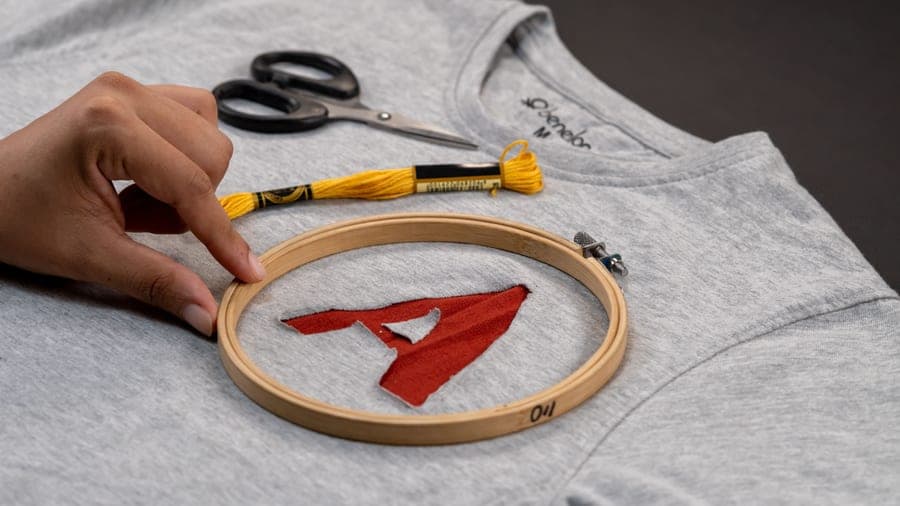
Disclosure: this page contains affiliate links. As an Amazon Associate, StitchStarter earns from qualifying purchases at no extra cost to you. Prices are read from Amazon daily and dated; the price you pay is the one Amazon shows at checkout. It never changes which machines we recommend. Full disclosure.
Quick picks
The short answer. Every pick is explained in full below, including who should skip it.
| # | Product | Best for | Score | Price |
|---|---|---|---|---|
| 1 | 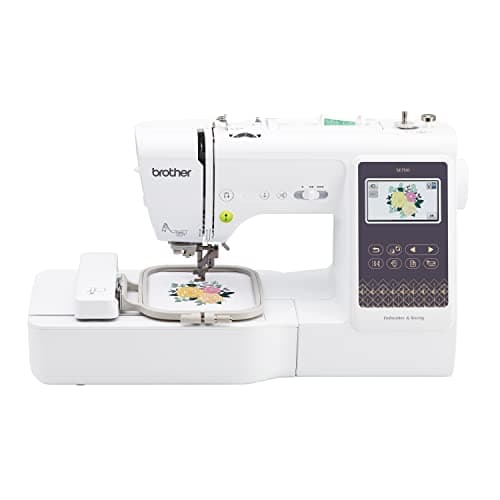 Brother SE700The only machine here with real embroidery lettering - 10 built-in fonts in a 4 x 4 inch field. | Best for monogramming overall | 7.4 | |
| 2 | 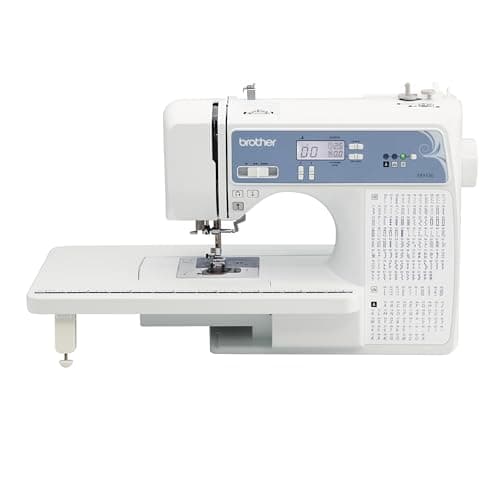 Brother XR955055 alphanumeric stitches, so it sews letters straight from the stitch library. | Best without an embroidery machine | 7.7 | |
| 3 | 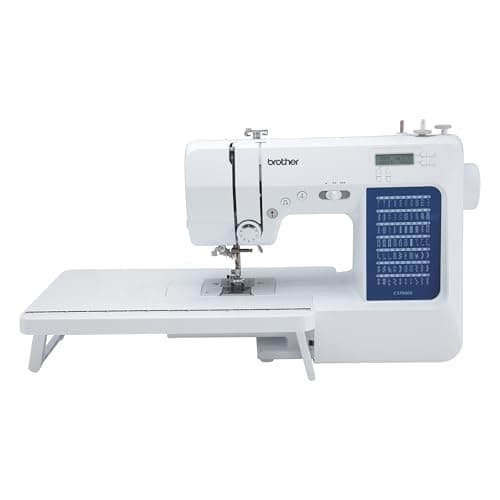 Brother CS7000XMonogramming foot and automatic drop feed in the box, plus a speed slider for the curves. | Best for free-motion monogramming | 8.2 | |
| 4 | 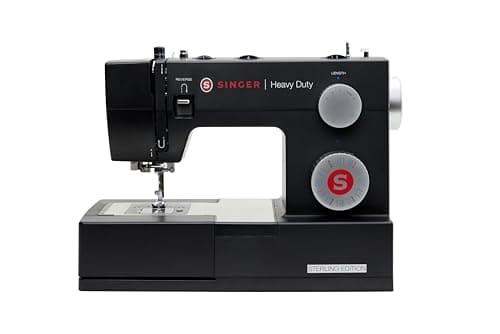 Singer Heavy Duty 4432Metal frame and drop feed, for a letter on a denim jacket or a canvas tote. | Best for monogramming thick items | 7.6 | |
| 5 | 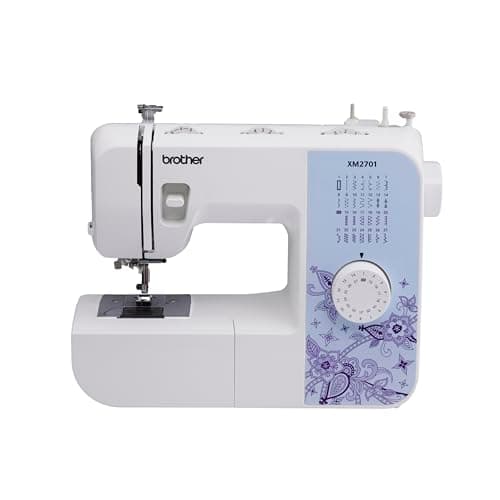 Brother XM2701An adjustable zigzag satin stitch and nothing else. Block letters only, and no free motion. | Budget pick - cheapest honest route | 7.3 |
Prices shown are Amazon prices as of November 22, 2026 and can change.Scores are our editorial judgment on six axes, explained on the methodology page. We do not run a test lab and never claim to.
If you want to put a name or an initial on something, buy the Brother SE700. It is the pick because it is the only machine in our registry that monograms the way people picture monogramming: you choose one of 10 built-in embroidery lettering fonts, type the letters on the color touchscreen, hoop the fabric, and the machine stitches them. Everything else on this page makes a letter a different and more hands-on way. If you do not want an embroidery machine at all, the Brother XR9550 sews letters directly from its stitch library — 55 of its 165 built-in stitches are alphanumeric — and the Brother XM2701 is the budget pick, with the honest limit that it can only do hand-guided block letters.
Before the picks, the thing that decides this purchase, because "monogramming" is one word covering three different machines. Prices sit inside the buy buttons, read from Amazon and dated.
The three ways a machine makes a letter
Nobody tells you this in a product listing, and it is the whole decision. A sewing machine can produce a letter in one of three ways, and they are not interchangeable.
One: embroidery lettering. The machine has an embroidery unit, a hoop and built-in alphabets stored as embroidery designs. You type a word, the machine moves the hoop under the needle and fills the letters in satin stitch. This is what a monogrammed towel from a shop looks like, and it is what most people searching for this actually want. Only the SE700 does it here.
Two: a built-in alphanumeric stitch set. An ordinary sewing machine with letters in its stitch menu. You select a character, sew it, stop, select the next one and sew that. The feed dogs move the fabric, so the letters come out in a straight line at a fixed size, like typed text. The XR9550 is the machine for this.
Three: a satin stitch you guide yourself. You draw the letter on the fabric, set a narrow dense zigzag, and follow the line by hand — either with the feed dogs still working, pivoting as you go, or with the feed lowered so you can move the fabric freely. Any machine with an adjustable zigzag can do this. It is a skill, it is also free, and it is how monogramming was done long before embroidery units existed.
Which route each machine on this page takes, from its manufacturer specification.
If this is the first time the distinction has been put to you plainly, our sewing machine vs embroidery machine guide is the longer version, and sewing machine stitches explained covers what a satin stitch actually is.
Best for monogramming overall: Brother SE700
The SE700 is a sewing machine and a 4 x 4 inch embroidery machine in one box, and for monogramming the embroidery half is the point. Brother lists 10 built-in embroidery lettering fonts alongside 135 built-in embroidery designs, so the alphabets are on the machine the day it arrives — you are not buying font files to get started. The color touchscreen previews the word before you commit thread to fabric, which matters more with lettering than with any other kind of embroidery, because a misspelled monogram is a ruined towel. Designs transfer wirelessly rather than by USB stick. On the sewing side it is still a competent everyday machine with 103 stitches and 10 buttonhole styles.
Who should skip it. Anyone who mainly wants to make clothes or quilts — the same money buys a better dedicated sewing machine, and we say so on its own review. Anyone monogramming anything large: 4 x 4 inches is the hard ceiling, and it is the limit owners run into first. And anyone who has not budgeted for the consumables, because embroidery quietly costs money forever — stabilizer, embroidery thread, bobbin thread, needles. Our Brother SE700 review is the full version, and sewing and embroidery machines for beginners is the roundup if embroidery generally, not lettering specifically, is the goal.
Best without an embroidery machine: Brother XR9550
This is the pick most people have never been told about. The XR9550 is an ordinary computerized sewing machine, no hoop and no embroidery unit, and 55 of its 165 built-in stitches are alphanumeric characters — Brother also lists one built-in lettering font. You pick a letter on the LCD, sew it, pick the next one. It will put a name on a backpack, a set of initials inside a jacket collar or a label on a quilt without a hoop, a stabilizer habit or a second machine. A monogramming foot is among the eight feet included, and the oversized wide table comes in the carton, which helps when the item you are lettering is bigger than the machine bed.
Who should skip it. Anyone expecting a shop-quality script monogram. These are typed characters at a size the machine decides, sewn in a line — closer to a label than to the interlocking three-letter monogram people have in mind. And anyone who wants our top pick's speed slider, which the XR9550 does not have. Our CS7000X vs XR9550 comparison is the direct answer on that trade, and machines with decorative stitches is the page if the stitch library as a whole is what interests you.
Best for free-motion monogramming: Brother CS7000X
Our overall best first machine is also the best machine here for the hand-guided route, and it is the cheapest way to a monogram that actually curves. Brother lists a monogramming foot among the ten feet in the box — a clear, open-toe foot that lets you see the line you are following — and the spec sheet lists drop feed as automatic, so the feed dogs come out of the way and you can move the fabric in any direction under a dense zigzag. The speed-control slider is what makes this learnable rather than frustrating: you can crawl around the inside of a letter instead of charging at it. The wide table gives the item somewhere to sit, and the walking foot and quilting foot in the same box are a reminder that this machine was bought to do more than monogram.
Who should skip it. Anyone who wants the machine to do the work. The quality of a free-motion monogram is entirely the quality of your hand, and the first dozen look like a first dozen. Anyone who prefers dials will find the menu fussy, and anyone regularly sewing canvas or upholstery wants a Heavy Duty instead. Our CS7000X review covers it properly, and presser feet explained describes what a monogramming foot is and what else would do the job.
Best for monogramming thick items: Singer Heavy Duty 4432
A letter on a denim jacket pocket, a canvas tote or a pair of work overalls is a different problem from a letter on a tea towel. Dense satin stitch over heavy fabric needs a machine that will not flex and will not stall, and the 4432 is that: a full metal interior frame, 1,100 stitches per minute, 32 built-in stitches, a documented drop feed so you can work free-motion over the thick panel, and an automatic needle threader and top drop-in bobbin so the setup stays out of the way. The one-step buttonhole is incidental here but it is a reason this is the Heavy Duty we recommend over the 4423 when decorative work is in play.
Who should skip it. Anyone who wants to go slowly: there is no speed limiter, it is loud, and all the throttle control comes from your foot — which is exactly the wrong set of properties for careful lettering on anything light. Treat this as the machine for monogramming heavy things, not the machine for monogramming. Our Singer 4432 review and machines for denim and heavy fabric put it in context.
Budget pick: Brother XM2701
The XM2701 is the cheapest machine we recommend that can put a letter on something, and it is on this page with its ceiling stated rather than hidden. It has 27 built-in stitches with an adjustable zigzag, which is all a hand-guided satin stitch needs, plus a jam-resistant quick-set top drop-in bobbin and an automatic needle threader. Mark out a block letter on stabilized fabric, drop the stitch length almost to nothing, widen the zigzag, and pivot at the corners with the feed dogs still working: that gives you clean straight-sided letters — an L, an M, a T — and it is a genuinely good way to label kids' gear.
Who should skip it. Anyone who wants a rounded letter. Brother's specification lists no drop feed for this model and no monogramming foot among its six feet, so true free-motion curves need a model-specific darning plate and an open-toe foot you buy separately — at which point the CS7000X was the better buy. Our Brother XM2701 review and best machines under $200 set the bracket.
Where this sits against our other pages
This page is about letters. If you want embroidery in general — designs, appliqué, patches — sewing and embroidery machines for beginners is the roundup, and machines for patches is the page for attaching finished badges rather than stitching your own. If what you actually want is a wider stitch library, machines with decorative stitches is organized around that, and machines for appliqué covers satin-stitching shapes, which is the same stitch as a monogram doing a different job. For the honest answer to whether you need two machines at all, read sewing machine vs embroidery machine.
The picks in full
01 - Best for monogramming overall
Brother SE700
A sewing machine and a 4x4 embroidery machine in one box.
- 103 sewing stitches plus 135 built-in embroidery designs
- 4 x 4 inch embroidery field
- Color touchscreen, wireless design transfer
- Automatic threader, drop-in bobbin
- Get it if
- You want to personalize things - names, monograms, patches, small designs - as well as sew.
- Skip it if
- You mainly want to make clothes or quilts. The same money buys a better dedicated sewing machine.
The trade-off
The 4 x 4 inch embroidery field is small, and embroidery has ongoing costs - stabilizer, thread, designs. Great at what it does; not a shortcut to a better sewing machine.
$579.99 · 14% off · price as of November 22, 2026
#ad - opens Amazon in a new tab. How we earn
How the Brother SE700 scores
Our judgment on the six axes described on the methodology page. Not measurements - we do not run a test lab.
- Setup and threading
- 8/10
- Everyday stitch quality
- 8/10
- Thick fabric
- 5/10
- Beginner features
- 8/10
- Durability reputation
- 7/10
- Help for this exact model
- 8/10
Overall 7.4/10
02 - Best without an embroidery machine
Brother XR9550
More stitches and a bigger screen than the CS7000X, for the same job.
- 165 built-in stitches - 110 utility and decorative plus 55 alphanumeric
- 8 one-step buttonhole styles
- LCD display and stitch selection
- Wide table included
- Automatic threader, drop-in bobbin
- Get it if
- You want the CS7000X's convenience with a larger display and more decorative stitches.
- Skip it if
- You would rather put the difference toward fabric - you will use a fraction of the stitch library.
The trade-off
The extra stitches are decorative. The real difference from the CS7000X is the display, and the CS7000X's speed slider is arguably worth more to a beginner.
$269.99 · 15% off · price as of November 22, 2026
#ad - opens Amazon in a new tab. How we earn
How the Brother XR9550 scores
Our judgment on the six axes described on the methodology page. Not measurements - we do not run a test lab.
- Setup and threading
- 9/10
- Everyday stitch quality
- 8/10
- Thick fabric
- 6/10
- Beginner features
- 8/10
- Durability reputation
- 7/10
- Help for this exact model
- 8/10
Overall 7.7/10
03 - Best for free-motion monogramming
Brother CS7000X
Does the fiddly parts for you so you can spend your energy learning to sew.
- 70 built-in stitches, 7 one-step buttonholes
- Automatic needle threader, drop-in top bobbin
- Speed-control slider
- Wide table and 10 presser feet included
- Get it if
- You want threading, buttonholes and stitch settings handled by the machine, and you might try quilting later - the wide table is already in the box.
- Skip it if
- You want physical dials instead of a menu, or you will be sewing canvas, upholstery or leather regularly.
The trade-off
A metal internal frame inside a light plastic shell. That makes it easy to carry and quiet on cottons and mid-weights; it is not built for heavy layers every day the way a Heavy Duty is.
How the Brother CS7000X scores
Our judgment on the six axes described on the methodology page. Not measurements - we do not run a test lab.
- Setup and threading
- 9/10
- Everyday stitch quality
- 8/10
- Thick fabric
- 6/10
- Beginner features
- 9/10
- Durability reputation
- 7/10
- Help for this exact model
- 10/10
Overall 8.2/10
04 - Best for monogramming thick items
Singer Heavy Duty 4432
The middle Heavy Duty - more stitches than the 4423, same bones.
- 32 built-in stitches (110 stitch applications), one-step buttonhole
- 1,100 stitches per minute
- Full metal interior frame, top drop-in bobbin
- Automatic needle threader, drop feed
- Get it if
- You want the Heavy Duty platform and will genuinely use stretch and decorative stitches.
- Skip it if
- You would only ever use straight and zigzag - the 4423 covers that for less.
The trade-off
It sews identically to the 4423. The stitch library is the whole difference, and most owners settle on four or five stitches within a month.
How the Singer Heavy Duty 4432 scores
Our judgment on the six axes described on the methodology page. Not measurements - we do not run a test lab.
- Setup and threading
- 7/10
- Everyday stitch quality
- 8/10
- Thick fabric
- 9/10
- Beginner features
- 6/10
- Durability reputation
- 8/10
- Help for this exact model
- 8/10
Overall 7.6/10
05 - Budget pick - cheapest honest route
Brother XM2701
The find-out-if-I-actually-like-this machine.
- 27 stitches, one-step buttonhole
- Automatic needle threader, drop-in bobbin
- 6 presser feet included
- Light enough to carry to a class
- Get it if
- You are not sure sewing will stick and you want a real, capable machine without spending what a better one costs.
- Skip it if
- You already know you will sew every week, or you want speed control and a quilting table.
The trade-off
Lightweight and basic. It does everything a beginner needs - buttonholes, zippers, hems - but you will outgrow it sooner than the CS7000X.
$149.99 · 13% off · price as of November 22, 2026
#ad - opens Amazon in a new tab. How we earn
How the Brother XM2701 scores
Our judgment on the six axes described on the methodology page. Not measurements - we do not run a test lab.
- Setup and threading
- 9/10
- Everyday stitch quality
- 7/10
- Thick fabric
- 5/10
- Beginner features
- 7/10
- Durability reputation
- 6/10
- Help for this exact model
- 9/10
Overall 7.3/10
Questions beginners actually ask
What is the best sewing machine for monogramming?
The Brother SE700. It is the only machine we recommend with real embroidery lettering - Brother lists 10 built-in lettering fonts and a 4 x 4 inch embroidery field - so you type the letters on the touchscreen and the machine stitches them. If you do not want an embroidery machine, the Brother XR9550 sews letters from its own stitch library instead: 55 of its 165 built-in stitches are alphanumeric.
Can you monogram with a regular sewing machine?
Yes, two ways. Some ordinary sewing machines have alphanumeric stitches built into the stitch menu, so they sew typed characters in a line - the Brother XR9550 has 55 of them. Any machine with an adjustable zigzag can also monogram by hand: you mark the letter on stabilized fabric, set a narrow dense satin stitch and follow the line yourself. That second method is free, works on almost any machine, and is a skill rather than a setting.
Do you need an embroidery machine to monogram?
Only if you want the shop-finished look. An embroidery machine with lettering fonts fills the letters automatically and consistently, which is why monogrammed gifts look the way they do. A hand-guided satin stitch on an ordinary machine produces a real monogram too, and a built-in alphanumeric stitch set produces neat typed characters - neither needs a hoop or an embroidery unit, and neither matches an embroidery font for consistency.
What is the cheapest way to monogram at home?
A machine you already own, plus stabilizer and a marking pen. Set a narrow dense zigzag, back the fabric with stabilizer, draw the letter and follow it, pivoting at corners. Of the machines we recommend, the Brother XM2701 is the cheapest that does this well, with the limit that its specification lists no drop feed - so straight-sided block letters are realistic and free-motion curves need a darning plate.
What stabilizer do you use for monogramming?
Tear-away or cut-away stabilizer behind the fabric, and a water-soluble topping on top of anything with a pile such as a towel or fleece. The stabilizer stops dense stitching from tunneling the fabric and puckering the letter; the topping stops the stitches sinking into the pile. Skipping either is the usual reason a first monogram looks wrinkled rather than crisp.
Sources
- Brother USA - SE700 specifications (lettering fonts, embroidery field)
- Brother USA - XR9550 specifications (165 stitches including 55 alphanumeric)
- Brother USA - CS7000X specifications and carton contents
- Brother USA - XM2701 specifications and included feet
- Singer (manufacturer specifications)
Specifications are taken from manufacturer listings. We do not run a test lab and never claim to - how each machine is assessed is set out on our methodology page.
Read next
- Best sewing and embroidery machines for beginners
If embroidery generally, not lettering, is the goal.
- Best sewing machines with decorative stitches
The stitch-library page, organized around the whole menu.
- Sewing machine vs embroidery machine
Whether you need one machine or two.
- Best sewing machines for appliqué
The same satin stitch, doing a different job.